European Accessibility Act 2025: Is your website accessible to everyone?

Summary
The European Accessibility Act (EAA) is kicking in on June 28th, 2025 and it is going to change the game for businesses in the EU when it comes to digital accessibility. From e-commerce sites and mobile apps to banking platforms and PDFs, accessibility is no longer a nice-to-have; it’s a legal requirement. In this post, I’ll break down what the EAA is, who it applies to, how it links to WCAG standards, and what you can do to make your website accessible and compliant, without compromising your brand.
Table of Contents
Warm-up
Today is the Global Accessibility Awareness Day (GAAD), and I decided to create an extensive practical guide about digital accessibility. With the European Accessibility Act (EAA) taking into action from June 28th quickly approaching, digital professionals across industries are scrambling to understand what this means for their websites, apps, and digital services. Having recently attended UXCamp in Switzerland, I was inspired to share some practical insights about this important legislation transforming how we approach digital design. As someone working at the intersection of UX design, branding, and marketing, I believe in putting users first, and this new regulation is all about exactly that.

What Is the European Accessibility Act and Why Should You Care?
The European Accessibility Act represents a landmark legislation designed to improve the accessibility of products and services for people with disabilities across the European Union. And this year, it’s not just another regulatory hurdle; it’s a fundamental shift in how we approach digital design and development.
Breaking Down the Basics
The EAA sets minimum accessibility requirements for a wide range of products and services. What makes the 2025 enforcement date particularly significant is that it introduces updated guidelines reflecting the latest technological advancements and user expectations, focusing on digital accessibility, with the purpose to ensure that people with disabilities can access and use digital content with the same ease as everyone else.
Who does the EAA Apply to, and what is the deadline?
If you’re thinking “this probably doesn’t apply to my business,” think again. The EAA covers organisations that offer:
Websites and web applications
Mobile apps
Digital documents (PDFs, e-books, etc.)
Self-service terminals (ATMS, ticket machines)
E-commerce platforms
Banking services
Transportation services
Small business owners, take note: this applies to you, too. While there may be some exceptions for microenterprises, most businesses offering digital products or services in the EU will need to comply. But don’t worry, according to Article 32, you will have a five-year window, until June 2030, to set the transition period. For things like self-service terminals, there is a window of up to 20 years if they’re still in their “economically useful life.” However, after these deadlines, full accessibility is non-negotiable.
The Cost of Non-Compliance
So, what happens if your website is not accessible? The European Accessibility Act (EAA) itself does not specify exact penalty amounts but mandates that EU member states establish “effective, proportionate, and dissuasive” penalties for non-compliance. So, failing to meet EAA requirements may apparently vary by country.
According to Recite me, in some countries, fines may reach up to 5% of a company’s global annual turnover (similar to GDPR), especially for persistent or severe violations. Other countries may set fixed fines per violation, which can range from €5,000 to €250,000. Beyond financial penalties, non-compliance can lead to reputational damage, increased scrutiny, and even the risk of being excluded from key markets.
And who will check if your website is complying or not? There’s a mix of automated scans, manual user testing, and national oversight. But I can assure you that if they don’t catch you, Google will — I will explain to you later.
Simply put: ignoring accessibility is no longer an option.
The Real Benefits of Accessibility for Websites, E-Commerce, Apps, and Digital Products
Let’s face it, accessibility isn’t just a checkbox for compliance or a “nice-to-have”. Whether running a website, an e-commerce store, or building the next must-have app, accessibility is a game-changer for your digital presence. As a UX designer passionate about creating seamless, human-centred experiences, I can tell you that accessibility is one of the smartest investments you can make. Here’s why:
1. Reach a Bigger Audience (and Don’t Leave Anyone Behind)
Over 100 million people in the EU alone live with some form of disability, and globally, that number climbs to over a billion. Accessibility opens your doors to this massive audience, but it also helps anyone facing temporary or situational barriers, like someone trying to shop one-handed on the tram, or a parent juggling a toddler while browsing your app. By making your digital products accessible, you’re not just ticking a legal box; you’re genuinely welcoming more people in.
2. Boost Your SEO and Visibility
Did you remember I said that Google may catch you?
Google and other search engines love accessible websites. Why? Accessible sites use clean, semantic HTML, logical headings, and descriptive meta tags, making it easier for search engines to crawl and understand your content. Features like alt text for images and clear navigation not only help users with disabilities but also improve your search rankings and organic traffic.
So, one of the elements Google uses to increase your visibility on the Search Engine Ranking Positioning is… Guess what? Yep, you are right: it is accessibility!
3. Deliver a Better User Experience for Everyone
Accessibility isn’t just for users with permanent disabilities. Features like captions, high contrast modes, and easy keyboard navigation benefit everyone, from someone watching videos in a noisy café to a user with tired eyes at the end of the day.
Accessible design leads to:
Smoother navigation and quicker load times.
More intuitive interfaces and fewer user errors.
Increased engagement and retention, especially for mobile apps.
4. Drive Revenue Growth and Conversions
Let’s talk business: accessibility can directly impact your bottom line. By removing barriers, you make it easier for more people to complete purchases, sign up for services, or engage with your content. Studies show that accessible sites often see higher conversion rates and customer loyalty.
According to Pixelplex, companies that invest in accessibility are more likely to win and retain customers, especially as accessible design improves user experience for everyone. The fact is that 85% of organisations see digital accessibility as a competitive advantage, according to the State of Digital Accessibility Report 2023–2024.
5. Strengthen Your Brand and Reputation
Prioritising accessibility shows that your brand cares about inclusivity and social responsibility. This isn’t just good PR, it’s a real differentiator in a crowded market. Customers are more likely to trust and recommend ethical, forward-thinking, and genuinely inclusive brands.
A 2024 Acquia survey found that 93% of consumers say it’s important that brands prioritise digital accessibility, and more than 60% would consider switching to a competitor if they encountered persistent accessibility issues.
6. Reduce Legal and Financial Risks
With regulations like the European Accessibility Act (EAA) coming into force, non-compliance can mean hefty fines and legal headaches. By investing in accessibility now, you’re protecting your business from future risks and demonstrating proactive responsibility.
7. Future-Proof Your Digital Products
Technology evolves fast, and so do user expectations.
Building accessibility into your foundation ensures your website, app, or digital product remains usable as new devices, browsers, and assistive technologies emerge. It’s about being ready for whatever comes next, especially with the rapid advances of AI.
Practical Tips for Making Your Digital Products More Accessible
Now that we understand the requirements and benefits, let’s talk about practical steps you can take today to improve accessibility.
What is EN 301 549 and what it has with the EAA?
Let’s clear up a common question: Why do both, European Accessibility Act and the EN 301 549 document matter for digital professionals?
The EAA sets the accessibility rules, and EN 301 549 gives the technical roadmap to follow. Together, they’re your ticket to building digital experiences that are open, inclusive, and future-ready for everyone.
The European Accessibility Act (EAA) is the EU’s directive that sets out the accessibility requirements, but here’s where it gets practical: EN 301 549 is the technical standard that brings the EAA to life. Think of the EAA as the “what” (the law that says digital experiences must be accessible), and EN 301 549 as the “how” (the detailed checklist and specifications you follow to make that happen). EN 301 549 covers everything from colour contrast and keyboard navigation to compatibility with assistive technologies.
If you’re designing or developing digital products for the EU market, aligning your work with EN 301 549 is the most straightforward way to ensure you’re meeting the EAA’s requirements and avoiding those hefty penalties down the line.
Understanding the Technical Requirements: WCAG and Beyond
Too difficult to remember the “EN 301 549”? Worry no more! It is based on Web Content Accessibility Guidelines (WCAG), which UX Designers and Developers are very familiar with — or they should.
WCAG is like the global playbook for accessible digital design; it lays out the technical “how-to” for making websites and apps usable for everyone, and EAA aligns closely with WCAG 2.1, which has become the global standard for digital accessibility.
WCAG is built around the four core principles of accessibility, referred to as the acronym POUR or the POUR principles:
Perceivable: everyone can see or hear your content.
Providing text alternatives for non-text content (like informational images, links, navigation menu, icons)
Creating captions for multimedia
Ensuring sufficient colour contrast
Using proper hierarchical heading structures (H1, H2, H3)
Operable: everyone can navigate it.
Making all functionality available via keyboard
Giving users enough time to read and use content
Not designing content that could cause seizures
Providing ways to help users navigate and find content
Understandable: your information is clear.
Making text readable and understandable
Creating content that appears and operates in predictable ways
Helping users avoid and correct mistakes
Robust: your code works with assistive tech like screen readers.
Using semantic HTML
Implementing ARIA roles when necessary
Ensuring your content is compatible with current and future technologies.
How Do I Make My Website Accessible to anyone?
You can easily test your website using Google Lighthouse, which will also highlight basic accessibility issues and performance issues. However, you can take four practical steps to enhance the accessibility of your digital content and ensure your brand is more inclusive.
Readability Matters
Readability isn’t just about choosing nice typography; it’s about ensuring everyone can consume your content.
Press enter or click to view image in full size

Photo by Dip Devices on Unsplash
Font Selection: Offer options for both standard and dyslexia-friendly fonts. Sans-serif fonts like Helvetica, Open Sans, and Myriad Pro are examples of very accessible fonts that are easy to apply to any brand. But you can also opt for special fonts like Lexend, OpenDislexy or Dislexie.
Text Alignment: In general, left text alignment is the best alternative for large text blocks. Centring text for titles or short text blocks is ideal, as it may be difficult for users with visual/cognitive impairments. And just avoid justified text.
Line Spacing: The minimum ideal is a space of 1.5 times the height of the text.
Text size: A size of 12pt (16px) for a regular body text is generally suggested. Large text is typically recommended as a minimum size of 18pt (24px). No text should be smaller than 9pt (12 px).
Colour Contrast is Non-Negotiable
Poor colour contrast can render content completely unreadable for many users. But it doesn’t mean you must kill your branding — be creative!
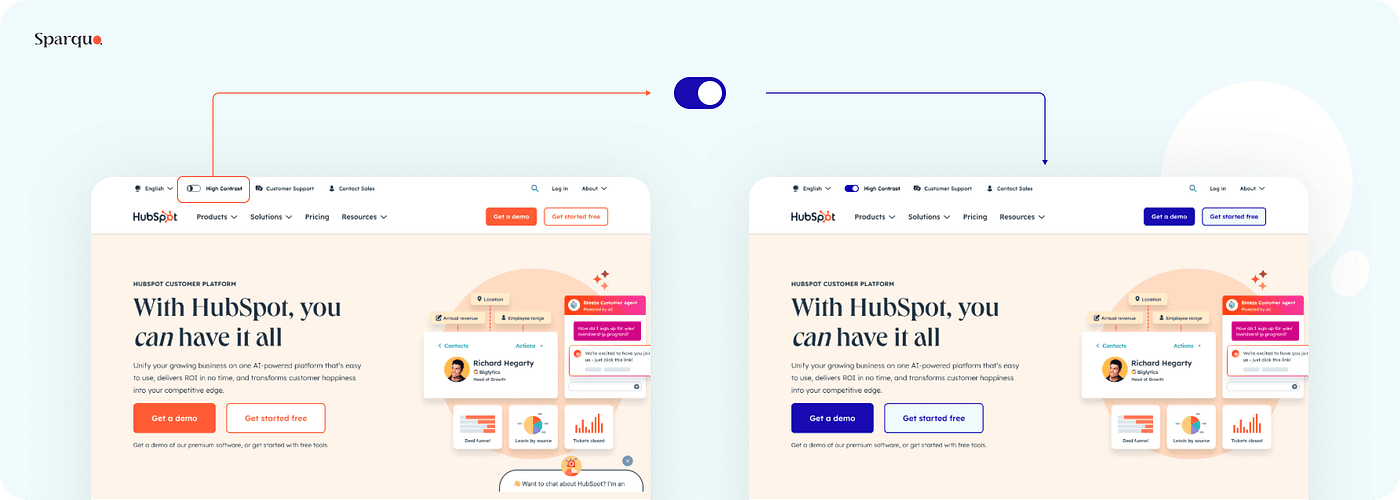
Hubspot created a switch button for high contrast
The EAA generally requires compliance at Level AA, which includes criteria like maintaining a contrast ratio of at least 4.5:1 for normal text and 3:1 for large text. So, you can check your website colour contrast by accessing the Developer Tools on Google Chrome, and check the colour contrast in Adobe Colour or even on Figma Colour Wheel completely for free.
Alt Text: The Invisible Accessibility Champion
Press enter or click to view image in full size
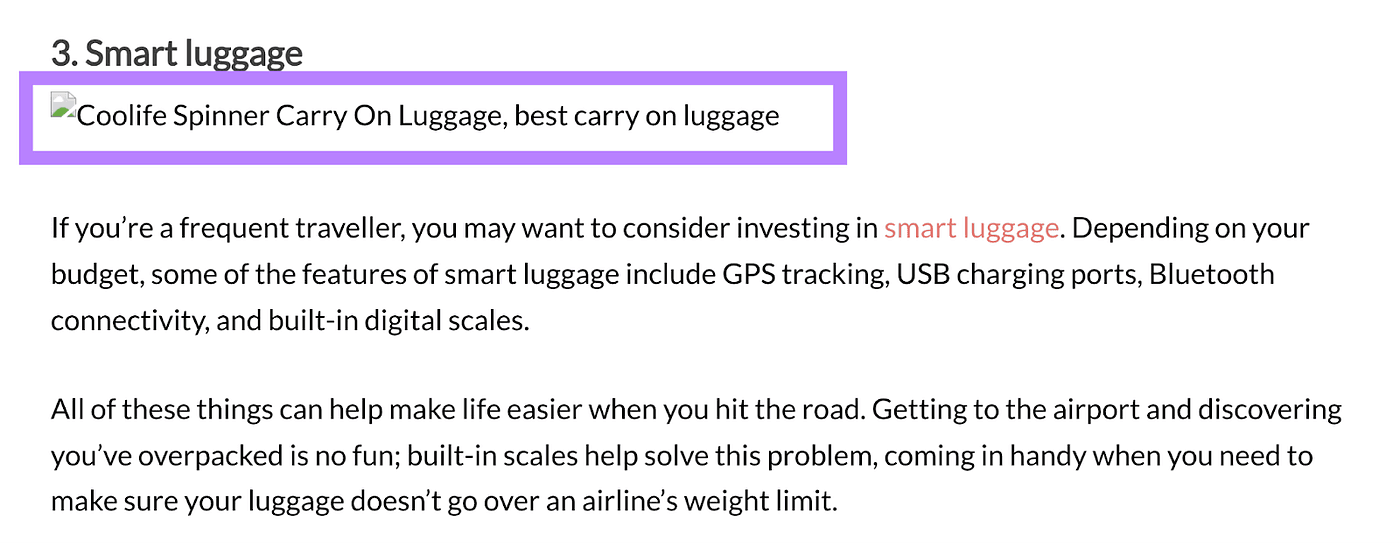
Example from SemRush
Alt text describes images for users who can’t see them, and it’s one of the simplest yet most impactful accessibility features:
Keep descriptions under 150 characters
Be specific about what the image shows
Avoid starting with “image of” or “photo of”
For images containing text, include that text in the alt description
Don’t duplicate information already in captions
Do not use on decorative images!
Remember that good alt text isn’t just about accessibility; it also improves your SEO.
Structure Your Content Properly and Follow ARIA Rules when necessary
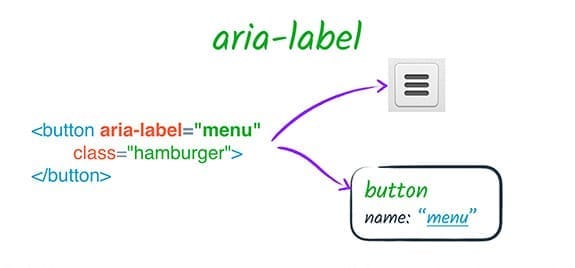
Example from Web.Dev
Proper HTML structure helps all users navigate your content more easily. For this step, you’ll need professional guidance to give you a hand, because it is more technical. ARIA (Accessible Rich Internet Applications) can enhance accessibility, but only when used correctly. Here are some examples:
Use semantic HTML elements (<header>, <nav>, <main>, <footer>) rather than generic <div> elements
Create a logical heading structure (H1, H2, H3, etc.) without skipping levels
Use lists (<ul>, <ol>) for grouped items
Implement proper descriptive form labels and error messages
Always support keyboard navigation
Use accessible names for interactive elements
You can test your website using Voice Over, an Apple accessibility tool that provides auditory descriptions of the screen content and allows users to interact with the device without visual input. For Windows, there are screen readers like NVDA or JAWS. The narrator should be smooth and make sense; otherwise, you should improve the structure of your website.
How to ensure accessibility on your website and other digital products or services?
In short: it’s important to hire specialists in this area. If you’re a small business, you might consider trying to improve your website’s accessibility on your own by following the four steps mentioned above. However, hiring professionals will allow for thorough testing and ensure full compliance with accessibility guidelines to any kind of digital products or services.
Accessibility isn’t just the responsibility of developers; it’s a team effort that involves a cross-collaboraiton from everyone in the digital creation process.
For Product Designers
Consider accessibility from the beginning of the design process, not as an afterthought
Create wireframes that account for keyboard navigation.
Check colour contrast during the design phase.
Design clear, intuitive navigation patterns.
Focus on an inclusive UX writing, especially labelling icons, buttons and non-decorative images.
Allow for text resizing without breaking layouts.
For Content Creators and Marketers
Write in clear, concise language
Structure content with proper headings
Provide captions and transcripts for multimedia content
Consider accessibility in your social media and email marketing
For Developers
Implement semantic HTML
Use ARIA roles when necessary
Ensure keyboard navigability
Test with screen readers and other assistive technologies
Create responsive designs that work across devices
Wrap it up: Face Accessibility as Opportunity
While the European Accessibility Act may initially seem like yet another regulatory burden, I encourage you to see it as an opportunity.
Do you feel like a big mountain to climb? You’re not alone. But what if we stopped seeing it as a “compliance task” and started embracing it as a shared responsibility to build better, more inclusive experiences for everyone? Doesn’t it feel more fulfilling?
By making your digital products and services more accessible, you’re not just avoiding penalties; you’re expanding your potential audience, improving user experience for everyone, and demonstrating your commitment to inclusivity.
So, what’s next?
Whether you’re a designer, developer, marketer or founder…
What else should we be thinking about to make accessibility future-ready?
What’s missing from your roadmap to truly embed inclusive design?
Warm-up
Today is the Global Accessibility Awareness Day (GAAD), and I decided to create an extensive practical guide about digital accessibility. With the European Accessibility Act (EAA) taking into action from June 28th quickly approaching, digital professionals across industries are scrambling to understand what this means for their websites, apps, and digital services. Having recently attended UXCamp in Switzerland, I was inspired to share some practical insights about this important legislation transforming how we approach digital design. As someone working at the intersection of UX design, branding, and marketing, I believe in putting users first, and this new regulation is all about exactly that.
What Is the European Accessibility Act and Why Should You Care?
The European Accessibility Act represents a landmark legislation designed to improve the accessibility of products and services for people with disabilities across the European Union. And this year, it’s not just another regulatory hurdle; it’s a fundamental shift in how we approach digital design and development.
Breaking Down the Basics
The EAA sets minimum accessibility requirements for a wide range of products and services. What makes the 2025 enforcement date particularly significant is that it introduces updated guidelines reflecting the latest technological advancements and user expectations, focusing on digital accessibility, with the purpose to ensure that people with disabilities can access and use digital content with the same ease as everyone else.
Who does the EAA Apply to, and what is the deadline?
If you’re thinking “this probably doesn’t apply to my business,” think again. The EAA covers organisations that offer:
Websites and web applications
Mobile apps
Digital documents (PDFs, e-books, etc.)
Self-service terminals (ATMS, ticket machines)
E-commerce platforms
Banking services
Transportation services
Small business owners, take note: this applies to you, too. While there may be some exceptions for microenterprises, most businesses offering digital products or services in the EU will need to comply. But don’t worry, according to Article 32, you will have a five-year window, until June 2030, to set the transition period. For things like self-service terminals, there is a window of up to 20 years if they’re still in their “economically useful life.” However, after these deadlines, full accessibility is non-negotiable.
The Cost of Non-Compliance
So, what happens if your website is not accessible? The European Accessibility Act (EAA) itself does not specify exact penalty amounts but mandates that EU member states establish “effective, proportionate, and dissuasive” penalties for non-compliance. So, failing to meet EAA requirements may apparently vary by country.
According to Recite me, in some countries, fines may reach up to 5% of a company’s global annual turnover (similar to GDPR), especially for persistent or severe violations. Other countries may set fixed fines per violation, which can range from €5,000 to €250,000. Beyond financial penalties, non-compliance can lead to reputational damage, increased scrutiny, and even the risk of being excluded from key markets.
And who will check if your website is complying or not? There’s a mix of automated scans, manual user testing, and national oversight. But I can assure you that if they don’t catch you, Google will — I will explain to you later.
Simply put: ignoring accessibility is no longer an option.
The Real Benefits of Accessibility for Websites, E-Commerce, Apps, and Digital Products
Let’s face it, accessibility isn’t just a checkbox for compliance or a “nice-to-have”. Whether running a website, an e-commerce store, or building the next must-have app, accessibility is a game-changer for your digital presence. As a UX designer passionate about creating seamless, human-centred experiences, I can tell you that accessibility is one of the smartest investments you can make. Here’s why:
1. Reach a Bigger Audience (and Don’t Leave Anyone Behind)
Over 100 million people in the EU alone live with some form of disability, and globally, that number climbs to over a billion. Accessibility opens your doors to this massive audience, but it also helps anyone facing temporary or situational barriers, like someone trying to shop one-handed on the tram, or a parent juggling a toddler while browsing your app. By making your digital products accessible, you’re not just ticking a legal box; you’re genuinely welcoming more people in.
2. Boost Your SEO and Visibility
Did you remember I said that Google may catch you?
Google and other search engines love accessible websites. Why? Accessible sites use clean, semantic HTML, logical headings, and descriptive meta tags, making it easier for search engines to crawl and understand your content. Features like alt text for images and clear navigation not only help users with disabilities but also improve your search rankings and organic traffic.
So, one of the elements Google uses to increase your visibility on the Search Engine Ranking Positioning is… Guess what? Yep, you are right: it is accessibility!
3. Deliver a Better User Experience for Everyone
Accessibility isn’t just for users with permanent disabilities. Features like captions, high contrast modes, and easy keyboard navigation benefit everyone, from someone watching videos in a noisy café to a user with tired eyes at the end of the day.
Accessible design leads to:
Smoother navigation and quicker load times.
More intuitive interfaces and fewer user errors.
Increased engagement and retention, especially for mobile apps.
4. Drive Revenue Growth and Conversions
Let’s talk business: accessibility can directly impact your bottom line. By removing barriers, you make it easier for more people to complete purchases, sign up for services, or engage with your content. Studies show that accessible sites often see higher conversion rates and customer loyalty.
According to Pixelplex, companies that invest in accessibility are more likely to win and retain customers, especially as accessible design improves user experience for everyone. The fact is that 85% of organisations see digital accessibility as a competitive advantage, according to the State of Digital Accessibility Report 2023–2024.
5. Strengthen Your Brand and Reputation
Prioritising accessibility shows that your brand cares about inclusivity and social responsibility. This isn’t just good PR, it’s a real differentiator in a crowded market. Customers are more likely to trust and recommend ethical, forward-thinking, and genuinely inclusive brands.
A 2024 Acquia survey found that 93% of consumers say it’s important that brands prioritise digital accessibility, and more than 60% would consider switching to a competitor if they encountered persistent accessibility issues.
6. Reduce Legal and Financial Risks
With regulations like the European Accessibility Act (EAA) coming into force, non-compliance can mean hefty fines and legal headaches. By investing in accessibility now, you’re protecting your business from future risks and demonstrating proactive responsibility.
7. Future-Proof Your Digital Products
Technology evolves fast, and so do user expectations.
Building accessibility into your foundation ensures your website, app, or digital product remains usable as new devices, browsers, and assistive technologies emerge. It’s about being ready for whatever comes next, especially with the rapid advances of AI.
Practical Tips for Making Your Digital Products More Accessible
Now that we understand the requirements and benefits, let’s talk about practical steps you can take today to improve accessibility.
What is EN 301 549 and what it has with the EAA?
Let’s clear up a common question: Why do both, European Accessibility Act and the EN 301 549 document matter for digital professionals?
The EAA sets the accessibility rules, and EN 301 549 gives the technical roadmap to follow. Together, they’re your ticket to building digital experiences that are open, inclusive, and future-ready for everyone.
The European Accessibility Act (EAA) is the EU’s directive that sets out the accessibility requirements, but here’s where it gets practical: EN 301 549 is the technical standard that brings the EAA to life. Think of the EAA as the “what” (the law that says digital experiences must be accessible), and EN 301 549 as the “how” (the detailed checklist and specifications you follow to make that happen). EN 301 549 covers everything from colour contrast and keyboard navigation to compatibility with assistive technologies.
If you’re designing or developing digital products for the EU market, aligning your work with EN 301 549 is the most straightforward way to ensure you’re meeting the EAA’s requirements and avoiding those hefty penalties down the line.
Understanding the Technical Requirements: WCAG and Beyond
Too difficult to remember the “EN 301 549”? Worry no more! It is based on Web Content Accessibility Guidelines (WCAG), which UX Designers and Developers are very familiar with — or they should.
WCAG is like the global playbook for accessible digital design; it lays out the technical “how-to” for making websites and apps usable for everyone, and EAA aligns closely with WCAG 2.1, which has become the global standard for digital accessibility.
WCAG is built around the four core principles of accessibility, referred to as the acronym POUR or the POUR principles:
Perceivable: everyone can see or hear your content.
Providing text alternatives for non-text content (like informational images, links, navigation menu, icons)
Creating captions for multimedia
Ensuring sufficient colour contrast
Using proper hierarchical heading structures (H1, H2, H3)
Operable: everyone can navigate it.
Making all functionality available via keyboard
Giving users enough time to read and use content
Not designing content that could cause seizures
Providing ways to help users navigate and find content
Understandable: your information is clear.
Making text readable and understandable
Creating content that appears and operates in predictable ways
Helping users avoid and correct mistakes
Robust: your code works with assistive tech like screen readers.
Using semantic HTML
Implementing ARIA roles when necessary
Ensuring your content is compatible with current and future technologies.
How Do I Make My Website Accessible to anyone?
You can easily test your website using Google Lighthouse, which will also highlight basic accessibility issues and performance issues. However, you can take four practical steps to enhance the accessibility of your digital content and ensure your brand is more inclusive.
Readability Matters
Readability isn’t just about choosing nice typography; it’s about ensuring everyone can consume your content.
Press enter or click to view image in full size
Photo by Dip Devices on Unsplash
Font Selection: Offer options for both standard and dyslexia-friendly fonts. Sans-serif fonts like Helvetica, Open Sans, and Myriad Pro are examples of very accessible fonts that are easy to apply to any brand. But you can also opt for special fonts like Lexend, OpenDislexy or Dislexie.
Text Alignment: In general, left text alignment is the best alternative for large text blocks. Centring text for titles or short text blocks is ideal, as it may be difficult for users with visual/cognitive impairments. And just avoid justified text.
Line Spacing: The minimum ideal is a space of 1.5 times the height of the text.
Text size: A size of 12pt (16px) for a regular body text is generally suggested. Large text is typically recommended as a minimum size of 18pt (24px). No text should be smaller than 9pt (12 px).
Colour Contrast is Non-Negotiable
Poor colour contrast can render content completely unreadable for many users. But it doesn’t mean you must kill your branding — be creative!
Hubspot created a switch button for high contrast
The EAA generally requires compliance at Level AA, which includes criteria like maintaining a contrast ratio of at least 4.5:1 for normal text and 3:1 for large text. So, you can check your website colour contrast by accessing the Developer Tools on Google Chrome, and check the colour contrast in Adobe Colour or even on Figma Colour Wheel completely for free.
Alt Text: The Invisible Accessibility Champion
Press enter or click to view image in full size
Example from SemRush
Alt text describes images for users who can’t see them, and it’s one of the simplest yet most impactful accessibility features:
Keep descriptions under 150 characters
Be specific about what the image shows
Avoid starting with “image of” or “photo of”
For images containing text, include that text in the alt description
Don’t duplicate information already in captions
Do not use on decorative images!
Remember that good alt text isn’t just about accessibility; it also improves your SEO.
Structure Your Content Properly and Follow ARIA Rules when necessary
Example from Web.Dev
Proper HTML structure helps all users navigate your content more easily. For this step, you’ll need professional guidance to give you a hand, because it is more technical. ARIA (Accessible Rich Internet Applications) can enhance accessibility, but only when used correctly. Here are some examples:
Use semantic HTML elements (<header>, <nav>, <main>, <footer>) rather than generic <div> elements
Create a logical heading structure (H1, H2, H3, etc.) without skipping levels
Use lists (<ul>, <ol>) for grouped items
Implement proper descriptive form labels and error messages
Always support keyboard navigation
Use accessible names for interactive elements
You can test your website using Voice Over, an Apple accessibility tool that provides auditory descriptions of the screen content and allows users to interact with the device without visual input. For Windows, there are screen readers like NVDA or JAWS. The narrator should be smooth and make sense; otherwise, you should improve the structure of your website.
How to ensure accessibility on your website and other digital products or services?
In short: it’s important to hire specialists in this area. If you’re a small business, you might consider trying to improve your website’s accessibility on your own by following the four steps mentioned above. However, hiring professionals will allow for thorough testing and ensure full compliance with accessibility guidelines to any kind of digital products or services.
Accessibility isn’t just the responsibility of developers; it’s a team effort that involves a cross-collaboraiton from everyone in the digital creation process.
For Product Designers
Consider accessibility from the beginning of the design process, not as an afterthought
Create wireframes that account for keyboard navigation.
Check colour contrast during the design phase.
Design clear, intuitive navigation patterns.
Focus on an inclusive UX writing, especially labelling icons, buttons and non-decorative images.
Allow for text resizing without breaking layouts.
For Content Creators and Marketers
Write in clear, concise language
Structure content with proper headings
Provide captions and transcripts for multimedia content
Consider accessibility in your social media and email marketing
For Developers
Implement semantic HTML
Use ARIA roles when necessary
Ensure keyboard navigability
Test with screen readers and other assistive technologies
Create responsive designs that work across devices
Wrap it up: Face Accessibility as Opportunity
While the European Accessibility Act may initially seem like yet another regulatory burden, I encourage you to see it as an opportunity.
Do you feel like a big mountain to climb? You’re not alone. But what if we stopped seeing it as a “compliance task” and started embracing it as a shared responsibility to build better, more inclusive experiences for everyone? Doesn’t it feel more fulfilling?
By making your digital products and services more accessible, you’re not just avoiding penalties; you’re expanding your potential audience, improving user experience for everyone, and demonstrating your commitment to inclusivity.
So, what’s next?
Whether you’re a designer, developer, marketer or founder…
What else should we be thinking about to make accessibility future-ready?
What’s missing from your roadmap to truly embed inclusive design?